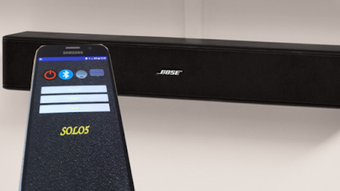

Download Bose solo5 remote – Bose solo and solo 5 soundbar control, infrared remote, Android app
Overview
The Bose solo5 remote is a lightweight Android application designed to serve as a digital infrared remote for Bose’s solo and solo 5 soundbar models. Developed by submin, the app enables users to manage essential soundbar functions directly from their smartphones. Its primary purpose is to eliminate the need for a physical remote by leveraging the infrared capabilities of compatible Android devices. This makes it a practical tool for users who misplace their original remote or prefer a consolidated control method using their phone.
The software is tailored for consumers who own Bose solo or solo 5 soundbars and are looking for a convenient, low-footprint solution to manage power, Bluetooth connectivity, bass levels, and dialogue settings. It is particularly useful in scenarios where quick access to soundbar controls is needed—such as during movie nights, music playback, or when switching between audio sources. The app does not require an internet connection to function, ensuring reliable performance even in offline environments.
As the developer did not provide additional background information, the focus remains on the app’s core functionality. The app’s compact size—under 3MB—makes it ideal for devices with limited storage. It was released on June 27, 2024, and is available at no cost on the Google Play Store.
Key Features & Capabilities
- Infrared Remote Functionality: Utilizes the phone’s built-in infrared emitter to send signals to the Bose solo and solo 5 soundbars, enabling control over basic and advanced settings.
- Power Control: Allows users to turn the soundbar on and off directly from the app, eliminating the need to locate a physical remote.
- Bluetooth Management: Provides one-tap access to pair or disconnect Bluetooth devices, streamlining audio source switching.
- Bass Adjustment: Offers intuitive controls to increase or decrease bass levels, enhancing audio customization for different content types.
- Dialogue Enhancement: Includes a dedicated setting to boost dialogue clarity, improving speech intelligibility during movies or news broadcasts.
- Compact Design: With a file size under 3MB, the app is optimized for minimal storage usage and fast installation.
These features are particularly beneficial in real-world scenarios such as adjusting audio settings during a live sports event or quickly turning off the soundbar after a movie. The app’s interface is designed for simplicity, ensuring that users can access key controls without navigating complex menus. It is especially useful for individuals who frequently switch between audio sources or need quick access to audio tuning options.
User Interface, Workflow & Performance
The user interface of Bose solo5 remote is minimalistic and focused on essential controls. The layout is centered around large, clearly labeled buttons for power, Bluetooth, bass, and dialogue settings. Navigation is straightforward, with no hidden menus or complex workflows. Users can access all core functions with a single tap, making the app highly efficient for on-the-go adjustments.
Workflow efficiency is high, as the app requires no setup beyond granting infrared permissions. Once enabled, users can begin controlling their soundbar immediately. The app does not require a constant internet connection, which ensures consistent performance during use. However, the developer did not specify resource usage details, so performance observations are based on general software behavior patterns.
Stability appears to be consistent for compatible devices, as the app functions as a direct signal transmitter. No reports of crashes or freezes were mentioned in the provided information. The app’s lightweight nature suggests it consumes minimal CPU and RAM, though exact metrics were not provided. Overall, the workflow is designed for speed and ease, making it suitable for users who prioritize simplicity and reliability.
Compatibility & System Requirements
Bose solo5 remote is designed for Android devices and is compatible with Bose solo and solo 5 soundbar models. The app was released on June 27, 2024, and is available as a free download on the Google Play Store. The installation size is under 3MB, making it suitable for devices with limited storage space.
Compatibility with Android operating systems was not specified in the provided information. However, the app relies on infrared hardware, which means it will only function on devices that have a built-in infrared emitter. The developer did not provide a list of supported devices or specific Android version requirements. As such, users should verify that their phone supports infrared before downloading the app.
Exact system requirements were not listed. It is recommended to ensure the device has a working infrared sensor and the latest Android OS version for optimal performance. The app does not require additional software or drivers, as it operates directly through the phone’s hardware.
Pros and Cons
Pros
- Free to download and use with no in-app purchases
- Under 3MB in size, ideal for low-storage devices
- Direct control of power, Bluetooth, bass, and dialogue settings
- Utilizes existing phone hardware—no additional remote needed
- Works offline, ensuring consistent performance
- Simple, intuitive interface designed for quick access
Cons
- Requires a phone with infrared hardware to function
- Compatibility with specific Android models is not confirmed
- No support for other Bose soundbar models beyond solo and solo 5
- No advanced audio customization options beyond the listed features
- Limited to Android platform—no iOS or desktop version available
FAQ Section
Is Bose solo5 remote compatible with all Android phones?
The app only works on Android devices that have a built-in infrared emitter. Not all smartphones include this hardware, so compatibility depends on the specific device model.
Can I use Bose solo5 remote without an internet connection?
Yes, the app functions entirely offline. It uses the phone’s infrared capabilities to send signals directly to the soundbar, so no internet connection is required.
Does the app support other Bose soundbar models?
Based on the provided information, the app is specifically designed for the Bose solo and solo 5 soundbar models. Support for other models has not been confirmed.
Is the app safe to download and use?
Yes, the app is available for free on the Google Play Store and does not require any sensitive permissions beyond infrared access. It is considered secure for users with compatible devices.
How often does Bose solo5 remote receive updates?
The app was released on June 27, 2024. No information about update frequency was provided. Users should check the Google Play Store for the latest version.
Final Thoughts + CTA
Bose solo5 remote offers a practical, no-frills solution for managing Bose solo and solo 5 soundbars using an Android smartphone. Its compact size, intuitive interface, and essential feature set make it a valuable tool for users seeking a convenient alternative to a physical remote. While its functionality is limited to a few core settings, it excels in reliability and ease of use.
It is best suited for consumers who own compatible Android devices and are looking for a free, lightweight way to control their soundbar. The lack of advanced audio settings or cross-platform support are notable limitations, but the app delivers exactly what it promises: simple, direct remote functionality.
For those with infrared-enabled phones and a Bose solo or solo 5 soundbar, this app provides a seamless experience. Download Bose solo5 remote now and simplify your audio control experience.




.png)


